

Hiring Product, Design, and AI Talent: What Actually Matters
April 13, 2026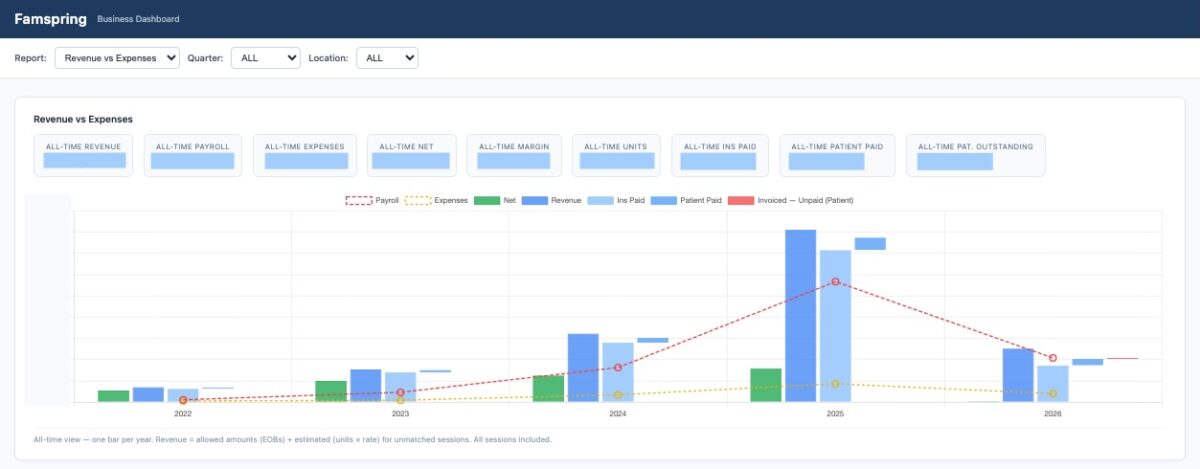
Disclaimer — this post is not about Enterprise level AI. See some of my thoughts on that. This post is just about playing around with AI tools to solve a small-business problem.
Say you are running a small business. Nearly 82% of them fail due to cash flow issues — and managing operations is hard. Your main source of revenue is insurance payments, but some insurance providers send you checks, some use electronic transfer. You invoice clients using QuickBooks, then move to Square. The services you deliver are all tracked electronically 🙂— but across five different systems 🙃.
You put your heart and soul into the service — but have limited visibility into how the business is actually doing. Sounds familiar? It is very familiar to me, since my wife — who runs a small business providing Autism services in Seattle — deals with such issues every day. She was planning to expand her service, and asked me (OK, a bit more stronger) to help. As I dug in, I realized the way I approached the problem was very different with the latest AI tools — specifically, Claude Code.
Approach. Usually, we use a mix of scripts, Excel, copious copy/paste, talking to experts, to get a sense of chaotic data. It is not Enterprise scale — so we are not dealing with a LOT of data, but not small either. After a cursory review, it was clear that a systematic approach will take a long time. Also, the data keeps changing — new clients get added, new issues pop up every week. So, decided to try something different. I have been using Claude Code for work. So, decided to use it for this task. “Can we build a simple business dashboard from chaotic data using Claude Code”
I had an idea of what I wanted to do. Create some SQL tables to store data, some parsers to understand invoices, and some basic UX to visualize it all. But here is the key insight. Given the time constraints, I didn’t want to start with a full product spec. I didn’t even know the shape of the data yet. I cobbled together information from the business — aka asking questions to my wife over dinner. I used Claude Code to build the product and write the spec at the same time.
This approach doesn’t work for large Enterprises — when you have a rich corpus of knowledge about the problem you are solving, and the ROI on time spent could be very high. But in a chaotic, smallish environment —you could make progress on the product, as you collect information about the problem. This sounds counterintuitive, but in a messy, evolving environment, it worked well. I asked Claude Code to document everything into a readme.md as we built — that became the product brief.
With Claude Code, you can build the product, plus write the product brief, at the same time
Step by step. I decided upfront that the ‘Business Dashboard app’ would run locally — with local files such as invoice exports and bank statements. VS Code was my tool of choice, and the code itself was checked into a Github repo. Claude Code worked very smoothly with this simple setup.
I worked with Claude to create the basic building blocks. We used SQLite for storage, Flask for the UI, and Node.js for application logic. Simple enough. Claude very quickly installed all the pre-requisites needed. I brushed up on the Readline shortcuts, there is lot of typing on the Claude Code terminal.
Claude inspected the data sources and suggested a schema. I tweaked it — adding columns, adjusting types, and simplifying where needed. I used Datasette to view the raw tables, and write some SQL queries to look at data. For our small dataset, it was easier to rebuild everything from source each time. It took under 30 seconds — which made schema changes trivial.
Somewhere along the way, I even gave Claude a name, and started using he/him as pronouns. Talk about Anthropomorphia (!?) in full swing, or is it just Anthropic 😉
Then, I guided Claude Code into processing the various documents and artifacts, into the tables we created. I provided some samples, and Claude caught on. There were mistakes — page breaks, slightly different invoice formats, misspelled names. But iteration was fast, and fixes were quick. The process was very similar to how you do software development — build an MVP, test it, make changes — but insanely fast.
I just laid out roughly how the UX should look like — and Claude figured out the UX details, which I could easily tweak. For instance, I wanted tables below the graph listing revenue by Client, payroll by Employee etc. And in a few minutes, it was done. I wanted to move the order of columns, add sorting/filtering — again, just a few more minutes. And this wasn’t a prototype, it was creating the real dashboard, with real data. My biggest takeaway: I could focus far more on outcomes than on scaffolding, layout, or setup. I could build the full experience quickly, then refine any part of it. This worked mainly because the dashboard users were just my wife and I. With a more involved UX, I would have used the Figma MCP server or Claude Design, things I plan to try soon.
My biggest takeway was that I could focus a lot more on the outcome of the app, rather than on building it
Outcome. In a few days, we had actionable insights across years of data. We always knew there were 1000s of payment dollars that we hadn’t followed up on. Now, we could export an Excel sheet with all the details — that our biller could use for collections. Improved cash flow, with ~2 days of work using tools I was already paying for — a strong ROI.
My takeaway: AI tools can solve practical, messy problems in ways that weren’t feasible even a year ago. And I had a lot of fun doing this 🎉. More work needs to be done to make this into a true more autonomous agent. But even in this messy form, AI added meaningful value.
As software gets cheaper and faster to build, even small business tools are starting to look very different.